Borderlands 4 SHiFT Codes for free Golden Keys (December 2025)
How to redeem SHiFT Codes in BL4 and get free Golden Keys


Looking for Borderlands 4 SHiFT Codes so you can claim free Golden Keys? Like with Tiny Tina's Wonderlands and Borderlands 3 before it, Gearbox's latest looter shooter features plenty of Golden Keys that unlock Golden Chests across Kairos. Each chest contains extremely rare gear, including Legendary Weapons, so it's well worth your time to open them all.
That's where this list of Borderlands 4 SHiFT Codes will help. These one-time use codes offer free Golden Keys that you can use to pop open Golden Chests. Codes are usually shared on socials, including the X account for Gearbox CEO Randy Pitchford, but to save you time we've rounded up all working Borderlands 4 SHiFT Codes in this guide, and we've also included details on how to redeem BL4 SHiFT Codes.
In this guide:
- Working Borderlands 4 SHiFT Codes
- Expired Borderlands 4 SHiFT Codes
- How to redeem BL4 SHiFT Codes
- How to create a SHiFT account

Working Borderlands 4 SHiFT Codes
| SHiFT Code | Rewards |
|---|---|
| J9XTB-SJWS3-WRTTC-BJTJJ-TH6TX | A Winter Borderland ECHO-4 Drone Skin (NEW) |
| 3ZXJB-HZBHT-KX3BK-BBTT3-BHHXJ | Children of the Vex Vault Hunter Skin (NEW) |
| 5ZWJ3-FKWS6-3959C-Z3TB3-W95J5 | 1x Golden Key (NEW) |
| JHXTB-RFWH3-C6335-TBBJB-JWWBH | 3x Golden Key |
| 3S6BB-ZXT93-KRT3W-BT3T3-JW6TZ | 1x Gourd Your Loins Vault Hunter Head 1x Hex Appeal Weapon Skin |
| BZ6JJ-CB6CT-WXJJW-3TT3B-56FZ5 | 1x Harlowe Maliwannabee Skin |
| BZ6JJ-CB6CT-WXJJW-3TT3B-56FZ5 | 1x Vex Mass Market Appeal Skin |
| JZ6BJ-SBR5J-WF3BK-BT3BB-TX9HB | 1x Amon Cult Classic Skin |
| TZXT3-XJXCB-CXBJW-BTTJT-9SK6B | 1x Rafa Savings Savior Skin |
| JS63J-JSCWJ-CFTBW-3TJ3J-WJS5R | 1x Break Free Pack 2x ECHO-4 Drone Skins |
| T9RJB-BFKRR-3RBTW-B33TB-KCZB9 | 1x Golden Key |
| Butterfinger Code For US Players Only | 1x Butterfinger ECHO-4 Drone Skin |
Last updated on 22 December, 2025: We added new Borderlands 4 SHiFT Codes.
Expired Borderlands 4 SHiFT Codes
- BZRB3-W65HT-CFJBC-B3JT3-K36XR
- T9F33-TXW9J-5RTT5-3JTJJ-RR6R6
- JZX33-ZKWST-5XT3W-JTBJ3-66BXB
- JHFJB-6KCHJ-5XBB5-JBTBJ-6FRRJ
- 3ZRBB-WCWZJ-5RJ3W-JJB33-JWBHS
- B9RJJ-B5W9J-5XTJ5-J333J-653CZ
- 5S5JJ-TCKZR-3ZC9C-HJT3B-6ZJXT
- W9CTT-ZBKZF-THK9K-HB3J3-WF5FF
- CSK3T-FBW9F-TZCS5-S3JBJ-R5JW9
- WHKJT-CBKHF-JSCHC-93B3J-5HHBJ
- CHCBB-KWWH6-BSKZC-SJ3TT-39S5Z
- BHRB3-XCWCJ-WFJTK-JTJJT-FCWF9
- J9RTT-KWCK3-CFBB5-BTBT3-FKRB6
- 3SRB3-95CC3-K6TB5-BTJTB-66ZHW
- 3H6BB-ZBKCJ-CFJT5-TBJJT-BFJHB
- J9FBT-B55KT-56TJW-3TT3B-JZBSW
- THR3J-XTKC3-WFBTW-3TT3T-W6B5R
- BZ6TT-JBWKB-KX3BK-BJT3T-5FS63
- 3Z6T3-CTWWB-KX3BW-3B3BT-SWBSB
- JZFTT-SSTC3-5FTT5-J3TB3-JSB9S
- 3S6TT-CZJWT-WXJT5-3B3BJ-JS3JZ
- TZR3T-JZJKJ-WXJTC-T33TB-RFCFR
- J96BJ-RZJWB-C6TJC-BBJJJ-5B5W9
- WZK3B-SHTHF-JZ59K-SBT3B-TWHXT
- BHXBB-W6BCB-WXJ3W-B3BTT-FTW3Z
- J9FB3-9XTW3-56JJK-TBBTJ-TF9X3
- BZX3B-6RTWB-5FTBW-TBT3B-3XZCT
- T963J-TRBKB-56JBW-3BJBJ-ZZ3JR
- JH63B-S5TK3-KFJJC-BBB3T-5KR63
- TZ6TT-FKBKB-W6T35-BTTB3-636SR
- 3HR33-KWBKT-KRJ3W-JBBTJ-FSTC3
- TZRBJ-3KTWT-KX3BC-TT3TB-B9ZSK
- T9XTB-93BC3-56T35-TBBJT-KF5TW
- 3S6TT-RSHJ3-WFJ3K-BBJB3-W5ZKS
- BH6TJ-Z993B-5RJBK-JT3B3-RXT3Z
- 3HXTT-JBJCT-CR33W-JJTJJ-BCR5W
- TH6BJ-WJTC3-W6B3C-3TTBT-5HTTH
- J9RT3-RBJ5T-WRTBK-JB3J3-5TB3R
- TZFT3-K9Z33-5FT3W-BJ33T-WZ5X5
- THRBT-WW6CB-56TB5-3B3BJ-XBW3X
- JH6BB-6RST3-5FB35-JT3BB-R3WCB
- JZRTJ-SR9BB-W6T35-BJBTT-36FZR
- BSFTB-TZ9BB-KRJBK-TTJB3-6S3KS
- WHWJB-XH3SX-39CZW-H3BBB-BTF55
- BHRBJ-ZWHT3-W6JBK-BT3BB-CW3ZK
- JSX3J-B6SBJ-CXTBC-B3T3B-BZZZT
- BHFJ3-WXHBB-W63JK-B33B3-5HX95
- JHFTJ-R5HBT-KF3TK-TBJT3-JJTHH
- J9XBB-KK9T3-CRTBW-BBT3T-KTBTW
- 3SR3J-CS63T-CFB3K-J3JTT-RZ5JR
- 3SRBB-X9RBJ-CRTBW-3BBB3-KJFW6
- 3H63J-Z3S3J-KR3BK-BTJ33-ZWKTK
- TSR3B-J5S3T-KRBJW-BTTBJ-JRCXX
- 39RTJ-3JZTJ-C6T35-JBTT3-5TFCC
- BSRT3-FTZBJ-K6BTW-JB3T3-WXT99
- 3ZXJB-53STT-56T3W-B3TT3-HTS95
- 39RTT-3ZR3T-5FJBK-3J3J3-C5CRT
- B9XT3-HX6TT-W6BBW-TTJT3-JTFKX
How to redeem Borderlands 4 SHiFT Codes
Before you can redeem codes in Borderlands 4, you'll need to create a SHiFT account. You might already have an account if you've played previous Gearbox games, but if not, refer to the section of this guide on how to create a SHiFT account.
Once you've got a SHiFT account created, there are two different ways you can redeem SHiFT codes - either in-game or online:
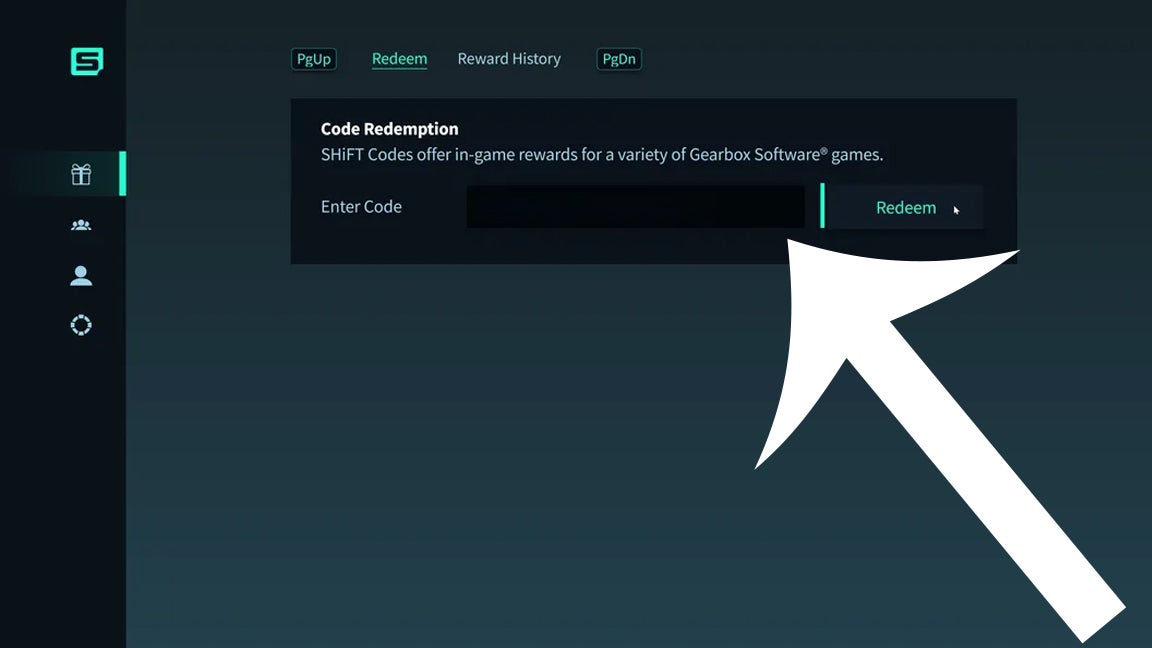
How to redeem SHiFT Codes in-game
Here's how you can redeem Borderlands 4 SHiFT Codes in-game:
- Launch Borderlands 4.
- Head to the "SHiFT" menu. You can access this via the starting menu or the in-game menu that appears when you pause.
- Select the "Rewards" tab.
- Type a code into the text box and then press the "Redeem" button.
How to redeem SHiFT Codes online
Alternatively, here's how you can redeem Borderlands SHiFT Codes on your web browser:
- Head to the official SHiFT codes website and login to your account.
- Then, choose the "Rewards" tab on the left.
- Type a code into the text box and then press "CHECK".
- A message will then appear asking you to confirm which platform you'd like to redeem the code for.
- Press the redeem button next to the game you'd like to claim the code for. Sometimes, SHiFT codes offer freebies for multiple Gearbox games.
- Once the code has been redeemed, you'll be able to scroll down and see a history of all the SHiFT Codes you have redeemed.

How to create a SHiFT account
If you want to redeem Borderlands 4 SHiFT Codes, you need to have a SHiFT account. To create an account, go to the official SHiFT codes website. Once there, you can either create an account via email or by logging into an existing account for a service like Xbox Live or PSN.
How to create a SHiFT account with email
Here's how to create a new SHiFT account with an email address:
- Head to the SHiFT codes website.
- Select the "Create new account" button.
- Then, choose "Create new account with email".
- Enter in the requested details, and then press the "Sign up" button.
- You'll be sent a confirmation email with a link you need to click on. Once you've done that you can login to your SHiFT account.
- After logging in, you'll need to select the "Gaming Platforms" tab on the left.
- Then, you'll have to link your SHiFT account to whichever platform you use to play Borderlands 4. For instance, if you play on Steam, select the "Sign in" button under the Steam logo to link your accounts. Linking accounts is important - you'll want your rewards credited to the platform you're actually playing on, after all!


How to create a SHiFT account by logging into another service
Alternatively, you can create a new SHiFT account by logging into an existing account for a service like Steam, Xbox Live, or PSN. If you create a SHiFT account this way, your account for Steam, Xbox Live etc will automatically be linked, which makes the process a bit quicker.
Here's how to create a new SHiFT account by logging into another service:
- Head to the SHiFT codes website.
- Select the icon for the other service (i.e Steam, Xbox Live, PSN) you want to log into.
- Login to that service, and then enter the requested details on the SHiFT website. You'll still need to enter an email address and password associated with your SHiFT account.
- You'll receive a confirmation email. Click on the link in that email, and then you can login to your new SHiFT account. The other platform you selected at the beginning of the setup process (i.e Steam, Xbox Live, PSN) will automatically be tied to your account.

That wraps up our guide to Borderlands 4 SHiFT Codes. If you want more BL4 content, why not check out our guides on all Vault Key Fragments and Primordial Vault locations? If you're looking for builds, we've also got an in-depth guide on the best Vex builds to get you started. Alternatively, if you need help with other Gearbox games, make sure you check out our lists of Tiny Tina's Wonderlands SHiFT Codes and Borderlands 3 SHiFT Codes as well.
Read this next
- Mafia: The Old Country did better than Take-Two expected, now please do more "contained" story romps at decent prices
- Borderlands 4's first bounty pack DLC releases next month, followed by a free mutant tree fight
- Borderlands 4 director warns next patch will target overpowered builds relying on "unintended interactions"